
Replay
Replay is a new system I developed for Box2D. The main goal is to allow users to send me files I can use to reproduce bugs. Because Box2D is open source, I can rarely run a user’s game or see their code in full context. This makes it hard to track down problems. Previously in v2.4 a user could use b2World::Dump to save a text file that let me reproduce bugs. This file is just C++ code that would recreate the world using the standard definitions such as b2BodyDef. This worked quite well but the dump file had many limitations:
- it didn’t include the internal state of Box2D
- it didn’t include queries
- it could not represent API calls to apply forces and impulses
I decided to build a new recording system that could faithfully capture a small simulation over a few seconds that could exactly reproduce what a user was seeing in their game.
Making a recording
I wanted recording to be easy for a game to implement. It involves just a few function calls.
int initialCapacity = 32 * 1024;
b2Recording* recording = b2CreateRecording( initialCapacity );
b2World_StartRecording( worldId, recording );

// ... run your game

b2World_StopRecording( worldId );

b2SaveRecordingToFile( recording, "my_recording.b2rec" );
b2DestroyRecording( recording );
Recording can start at any point in the simulation. When you start a recording it captures the initial state of the world. This copies all the internal data structures in Box2D. So you can start and stop the recording immediately to just capture the world state. But it is more useful to capture the simulation over time.
Once the recording is started, further Box2D operations are captured by just recording the function arguments. For example, if you call:
b2Body_ApplyLinearImpulse( bodyId, impulse, point, wake );
This will append an opcode and the function arguments to the recording.
Calls to b2World_Step follow the same process. This records an opcode, the time step, and the number of sub-steps. It also records a hash of the body transforms and velocities for validation of determinism.
Recording captures all body creation and destruction operations. It captures all the forces and impulses applied. It even captures all the ray casts and other queries. It should capture anything that modifies the world or things in the world.
The recording file is a header, followed by a full snapshot, followed by many opcodes and their arguments.
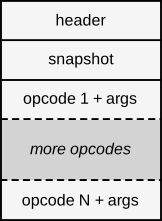 File Structure
The file is binary to keep it compact and fast. These files can get quite large, especially for large worlds. However, it is about as efficient as it can be while providing determinism.
Replay
The Box2D samples application has a sample that is the Replay Viewer. It gets special treatment in the samples app, including its own menu, outliner, and time scrubber.
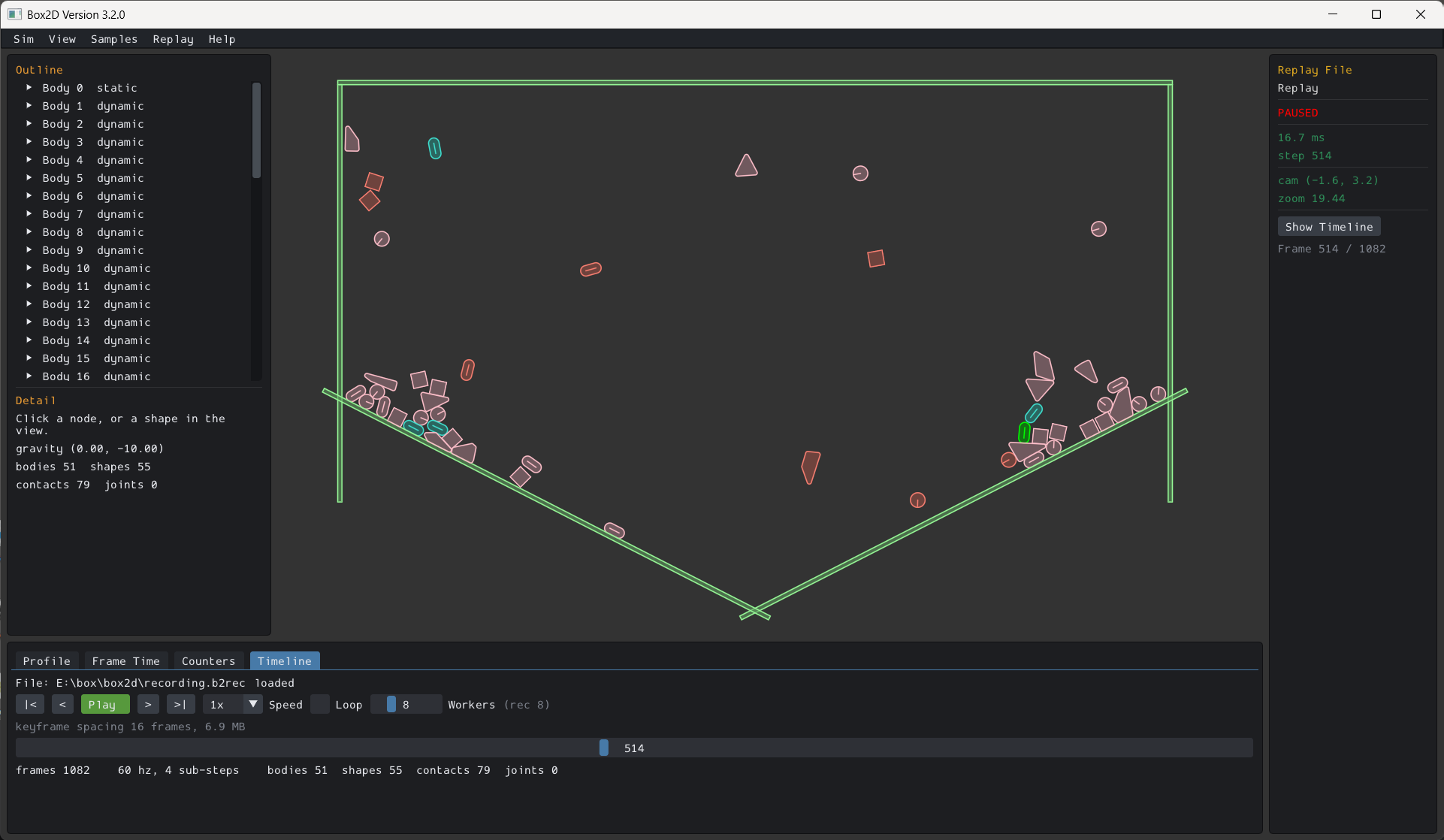 Replay Viewer
The replay viewer creates and simulates a live b2World based on the recording. It loads the initial snapshot, then faithfully applies all recorded API calls, including stepping this world. This means you can view all simulation data, including contact points, contact and joint impulses, body velocities, and so on.
When you first load a recording it generates key frames. These key frames are full snapshots at evenly spaced time intervals across the full time span of your recording. The default is one key frame every 16 time steps. Generating key frames takes time and memory. You can set a memory budget in megabytes and the replay system will generate as many key frames as possible to live within that budget.
There are two benefits of this key frame system. First, more key frames at smaller intervals means scrubbing is faster, especially when there are many moving bodies. Second, run-time generation of key frames means they don’t need to be stored in the recording. This keeps the file size under control.
In principle you could host replay in your own application using the Box2D API. But I don’t expect this to be common. However, I encourage you to use the official replay viewer to help debug your game.
Queries
The recording and replay system can record queries, including their callback results. They can be viewed in the Replay Viewer. Queries are live. They perform the actual query as recorded, applying the recorded callback results. I expect this feature to be quite useful for debugging game code.
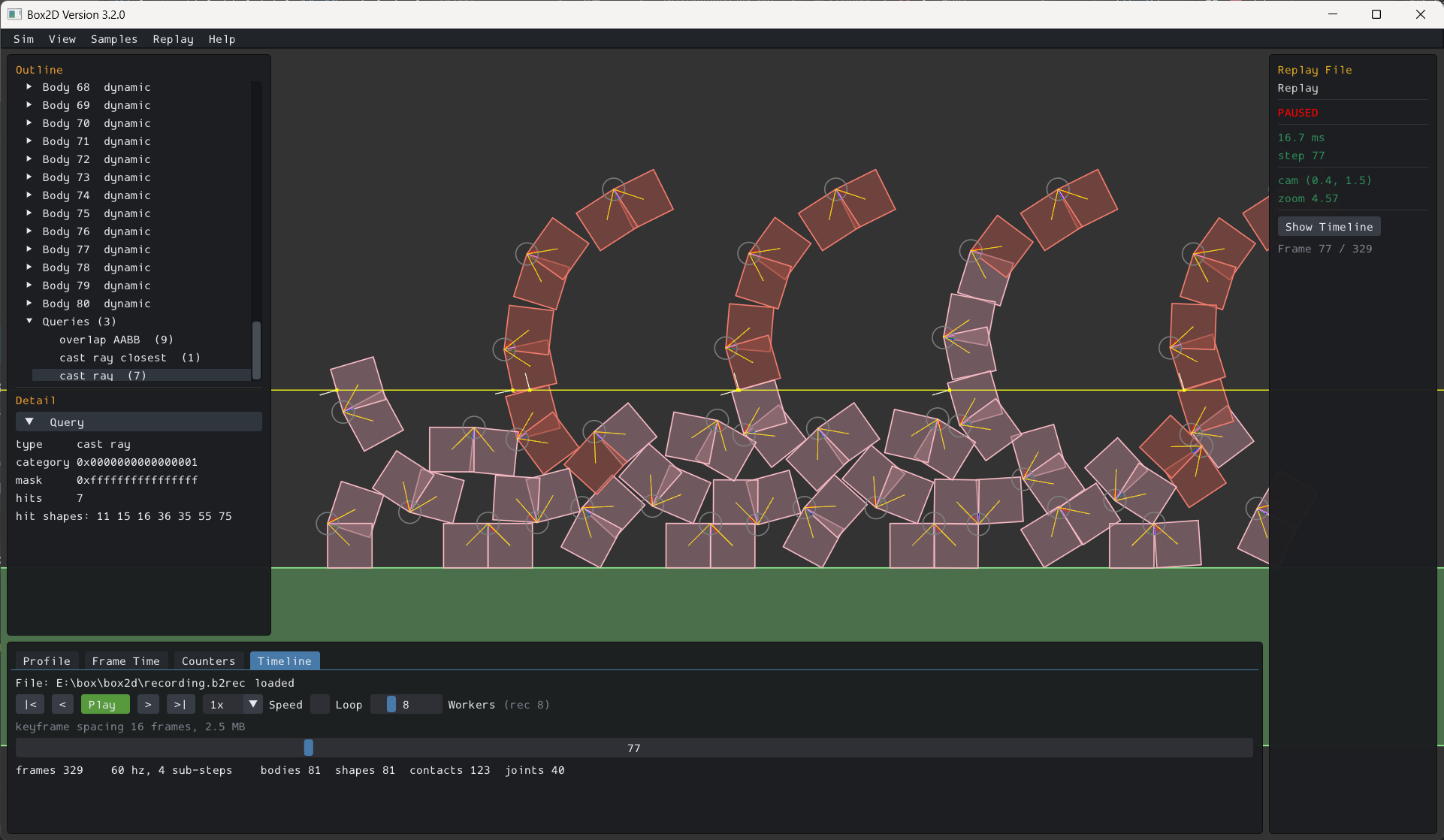 Query Replay
Snapshots
A highly requested feature of Box2D is rollback. The idea is that a game can take a snapshot of the world and then later reset to that snapshot to effectively rewind time. The replay system was not designed for this, but snapshots were needed to make replay work, so I’m making them available in the API. Here’s how they are used.
// First call gets the size, second fills the buffer.
int size = b2World_Snapshot( worldId, NULL, 0 );
uint8_t* image = malloc( size );
b2World_Snapshot( worldId, image, size );

// ... keep simulating ...

b2World_Restore( worldId, image, size );
free( image );
There are some limitations you should be aware of:
- Rollback simulation is only deterministic if all your game code is deterministic.
- Existing ids will continue working. However, rollback can orphan some ids and introduce ids the game may not be tracking. It is up to your application to manage this.
- The performance of these operations may be slow for large worlds and the image size can be large. It is unlikely you would want to send this data over a network unless your game world is small.
- It is not possible to snapshot a portion of the world.
Under the hood
The design of the replay system relies on some features native to Box2D. So it is worth reviewing those.
Determinism
Box2D treats determinism as a first class feature. This means recordings work cross platform and regardless of worker count. Read more in this post.
Determinism makes replay possible by recording a single snapshot followed by API call entries. Without determinism, I would need to record a snapshot for every time step. I would likely need to record a subset of the world state to keep the file size under control. Then the replay would not be live and I may not be able to reproduce bugs.
Handles
Box2D uses index based handles such as b2WorldId and b2BodyId. This means you can hold onto these handles when a world is restored and continue using them. You also get the safety of the embedded generation number.
Relocatable data
Internally Box2D connects data structures by indices, not pointers. This means data can be serialized and restored with minimal pointer work. This makes serialization efficient.
Plain old data
Box2D is written in C and uses plain old data (POD). This means data can be serialized and restored efficiently without calling many constructors and hooking up vtable pointers.
Data oriented design
Box2D primarily stores data in arrays. This means data can be serialized efficiently in bulk with a handful of memcpy calls.
Events instead of callbacks
Some physics engines are heavily entrenched in callbacks. Callbacks are generally bad for data flow and performance. They seem convenient but can create a tangled web of code.
By eschewing callbacks as much as possible, Box2D recording becomes much easier since callbacks do not guide simulation in most cases. Callbacks can also easily break determinism and create race conditions. These bugs can be incredibly difficult to catch and debug.
What’s next?
There are some missing pieces. I plan to investigate these in the future as the need arises.
- Record custom friction and restitution mixing callback results. Or better yet perhaps I can devise a mixing system that satisfies most use cases and get rid of these callbacks.
- Record custom filter callback results. In my opinion, most of the time these can be avoided by careful use of
b2Filterandb2FilterJoint. However, I may investigate recording these filter callbacks. This may break determinism. - Record pre-solve callback results. This callback is similar to the custom filter callback. It is also in a questionable state. I probably need to revisit this. There is always more stuff to do.
v3.2 progress
The replay system represents a big push towards v3.2. I want to do more work on character movement and then I think the next version will be ready. Stay tuned!
Video
I also made a video where I go over the features of the replay viewer. I hope you find it useful.