Caution: The written part of this manual is a work in progress. It will be updated as v1.0 approaches. The reference section should be complete and accurate.
Box3D is a 3D rigid body simulation library for games. Programmers can use it in their games to make objects move in realistic ways and make the game world more interactive. From the game engine's point of view, a physics engine is a system for procedural animation.
Box3D also provides many collision routines that can be used even when rigid body simulation is not used. There are functions for overlap and cast queries. There is also a bounding volume hierarchy (dynamic tree) that can be used for game specific spatial sorting needs.
Box3D is written in portable C17. Most of the types defined in the engine begin with the b3 prefix. Hopefully this is sufficient to avoid name clashing with your application.
In this manual I'll assume you are familiar with basic physics concepts, such as mass, force, torque, and impulses. If not, please first consult Google search and Wikipedia.
Box2D (the 2D sibling of Box3D) was created as part of a physics tutorial at the Game Developer Conference. You can get those tutorials from the publications section of box2d.org, which cover the underlying algorithms shared by both engines.
Since Box3D is written in C, you are expected to be experienced in C programming. Box3D should not be your first C programming project. You should be comfortable with compiling, linking, and debugging.
Caution: Box3D should not be your first C project. Please learn C programming, compiling, linking, and debugging before working with Box3D. There are many resources for this online.
This manual covers the majority of the Box3D API. However, not every aspect is covered. Please look at the Reference section and samples application included with Box3D to learn more.
This manual is only updated with new releases. The latest version of Box3D may be out of sync with this manual.
Caution: This manual applies to the associated release and not necessarily the latest version on the main branch.
Please file bugs and feature requests here: Box3D Issues
You can help to ensure your issue gets fixed if you provide sufficient detail. A testbed example that reproduces the problem is ideal. You can read about the testbed later in this document.
There is also a Discord server and GitHub Discussions.
Box3D works with several fundamental concepts and objects. I briefly define these objects here and more details are given later in this document.
A chunk of matter that is so strong that the distance between any two bits of matter on the chunk is constant. They are hard like a diamond. In the following discussion I use body interchangeably with rigid body.
A shape binds collision geometry to a body and adds material properties such as density, friction, and restitution. A shape puts collision geometry into the collision system (broad-phase) so that it can collide with other shapes.
A constraint is a physical connection that removes degrees of freedom from bodies. A 3D body has 6 degrees of freedom (three translation coordinates and three rotation coordinates). If I take a body and pin it to the wall (like a pendulum) I have constrained the body to the wall. At this point the body can only rotate about the pin, so the constraint has removed 3 translational degrees of freedom, leaving the body free to swing in 3D about the fixed anchor.
A special constraint designed to prevent penetration of rigid bodies and to simulate friction and restitution. You do not create contact constraints; they are created automatically by Box3D.
This is a constraint used to hold two or more bodies together. Box3D supports several joint types: revolute, prismatic, distance, spherical, weld, wheel, motor, parallel, and filter. Joints may have limits, motors, and/or springs.
A joint limit restricts the range of motion of a joint. For example, the human elbow only allows a certain range of angles.
A joint motor drives the motion of the connected bodies according to the joint's degrees of freedom. For example, you can use a motor to drive the rotation of an elbow. Motors have a target speed and a maximum force or torque. The simulation will apply the force or torque required to achieve the desired speed.
A joint spring has a stiffness and damping. In Box3D spring stiffness is expressed in terms of Hertz or cycles per second. This lets you configure how quickly a spring reacts regardless of the body masses. Joint springs also have a damping ratio to let you specify how quickly the spring will come to rest.
A physics world is a collection of bodies, shapes, joints, and contacts that interact together. Box3D supports the creation of multiple worlds which are completely independent.
The physics world has a solver that is used to advance time and to resolve contact and joint constraints. The Box3D solver is a high performance sequential solver that operates in order N time, where N is the number of constraints.
The solver advances bodies in time using discrete time steps. Without intervention this can lead to tunneling. 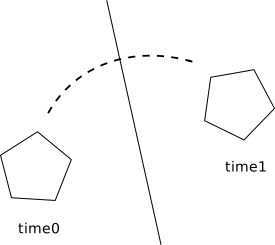
Box3D contains specialized algorithms to deal with tunneling. First, the collision algorithms can interpolate the motion of two bodies to find the first time of impact (TOI). Second, speculative collision is used to create contact constraints between bodies before they touch.
World simulation leads to the creation of events that are available at the end of the time step:
These events allow your application to react to changes in the simulation.
Box3D's primary purpose is to provide rigid body simulation. However, there are math and collision features that may be useful apart from the rigid body simulation. These are provided in the include directory. Anything in the include directory is considered public, while everything in the src directory is considered internal.
Public features are supported and you can get help with these on the Discord server. Using internal code directly is not supported. However, feel free to study the code and ask questions. I'm happy to share all the details of how Box3D works internally.
Box3D works with floating point numbers and tolerances have to be used to make Box3D perform well. These tolerances have been tuned to work well with meters-kilogram-second (MKS) units. In particular, Box3D has been tuned to work well with moving shapes between 0.1 and 10 meters. So this means objects between soup cans and buses in size should work well.
Static shapes may be up to 50 meters long without trouble. If you have a large world, you should split it up into multiple static bodies. This will improve precision and simulation behavior.
Caution: Box3D is tuned for MKS units. Keep the size of moving objects larger than 1cm. You'll need to use some scaling system when you render your environment and actors. Do not use non-metric units unless you understand the implications.
Another limitation to consider is overall world size. If your world units become larger than 12 kilometers or so, then the lost precision can affect stability.
Caution: Box3D works best with world sizes less than 12 kilometers. If you are careful with your simulation tuning, this can be pushed up to around 24 kilometers, which is much larger than most game worlds.
Box3D uses radians for angles. Orientation is stored as a quaternion (b3Quat), so there is no concept of a body angle clamped to a range; the full 3D rotation is tracked continuously.
Caution: Box3D uses radians, not degrees.
Advanced users may change the length unit by calling b3SetLengthUnitsPerMeter() at application startup. If you keep Box3D in a shared library, you will need to call this if the shared library is reloaded.
It is harder to get support for using Box3D if you change the unit system, because values are harder to communicate and may become non-intuitive. One of the benefits of using MKS units for physics simulation is that you can use real world values to get reasonable results.
Fast memory management plays a central role in the design of the Box3D interface. When you create a world, body, shape or joint, you will receive a handle called an id. These ids are opaque and are passed to various functions to access the underlying data.
These ids provide some safety. If you use an id after it has been freed you will usually get an assertion. All ids support 64k generations of safety. All ids also have a corresponding function you can call to check if it is valid.
When you create a world, body, shape, or joint, you need to provide a definition structure. These definitions contain all the information needed to build the Box3D object. By using this approach I can prevent construction errors, keep the number of function parameters small, provide sensible defaults, and reduce the number of accessors.
Here is an example of body creation:
Notice the body definition is initialized by calling b3DefaultBodyDef(). This is needed because C does not have constructors and zero initialization is generally not suitable for the definitions used in Box3D.
Also notice that the body definition is a temporary object that is fully copied into the internal body data structures. Definitions should usually be created on the stack as temporaries.
This is how a body is destroyed:
Notice that the body id is set to null using the constant b3_nullBodyId. You should treat ids as opaque data, however you may zero initialize all Box3D ids and they will be considered null.
Shapes are created in a similar way. For example, here is how a box shape is created:
And the shape may be destroyed as follows:
For convenience, Box3D will destroy all shapes on a body when the body is destroyed. You don't need to store the shape id.
There are some macros to assist using ids in logical operations.
 1.17.0